SDK
djsonapi generates sealed, typed SDKs from your API definition. The output is plain code that mirrors your exact resource types, operations, query parameters — with full IDE autocomplete.
How it works
The server's DjsonApi registry holds every endpoint, resource class, and query
parameter. The SDK generator reads this registry and writes plain source files.
You copy the output directory into your project and install the dependencies
manually (only aiohttp for Python, zero for TypeScript).
The generated package contains:
- A concrete class per resource type with the exact fields, relationships, and capabilities your server exposes
- Typed method signatures for
get,create,save,delete,find, relationship mutations — only those actually registered - A
Collectionclass with typed filter/sort/page methods matching your declared query parameters - Error classes for every HTTP status your server can return
Runtime
Both Python and TypeScript SDKs include a runtime layer (_runtime/) that
handles the JSON:API protocol — parsing responses, serializing requests,
resolving included resources, managing relationship stubs.
The runtime is copied verbatim into the generated package. The SDK has zero
dependency on djsonapi itself.
Python vs TypeScript
- Dependency:
aiohttp(for async HTTP) - Async-only (
async with sdk:,await resource.save()) - Dataclass-based Resource classes
CollectionisSequence[T]with lazy chaining
- Zero npm dependencies (uses
fetch,URL,URLSearchParams) - Async with native
fetch - Class-based Resource with getters/setters
CollectionisAsyncIterable<T>with lazy chaining
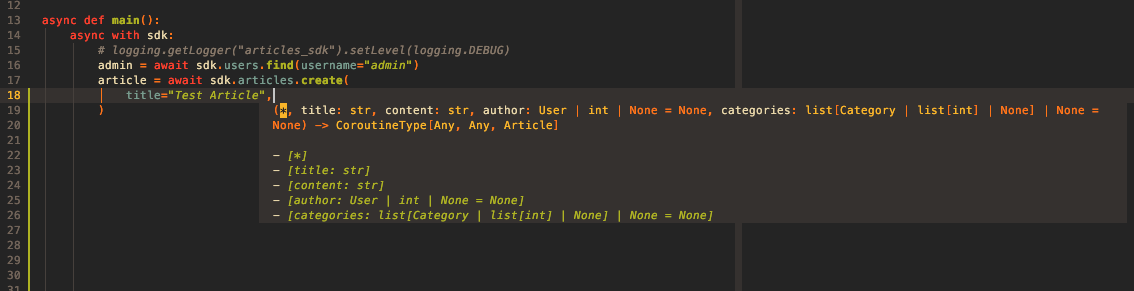
IDE support
Generated SDKs are fully typed — every method, every parameter, every return value: